A guard checks in at the front gate. Clocks a tour. Logs an incident. Everything looks perfect on paper until a client calls asking why nobody was at the loading dock when their warehouse got hit.
Sound familiar?
A guard tour system is supposed to make moments like that impossible. It tracks where your officers are, what they’re doing, and whether the job actually got done. But here’s the thing: even the best technology breaks down when it’s set up wrong, ignored by the people using it, or stretched past what it was built to handle.
We’ve spent years working alongside security firms of every size, and the same handful of issues come up again and again. The good news? Every single one of them is fixable. Below are the 7 most common problems with a guard tour system and exactly how to solve each one without ripping out your whole setup.
Why Guard Tour Systems Fail (When They Shouldn’t)
Before we get into the specifics, let’s be honest about something. Most guard tour system failures aren’t software failures. They’re process failures dressed up as tech problems.
A patrol tour system is only as reliable as the habits around it the training, the device management, the way data flows back to your office. Get those right, and the technology disappears into the background and just works. Get them wrong, and you’ll blame the app for problems it was never causing.
With that in mind, here are the seven culprits.
1. GPS Drift and Inaccurate Location Tracking
This is the big one. A guard swears they walked the full perimeter, the security guard tracking app says they were standing in the parking lot the whole time, and now nobody trusts the data.
GPS drift happens for real reasons: tall buildings bounce signals around, dense tree cover blocks satellites, and indoor environments like parking garages or basements barely get a fix at all. When your location data is off by 50 meters, accountability goes out the window.
How to Fix It
- Pair GPS with checkpoint verification. Don’t rely on coordinates alone. Use QR or NFC tour tags at fixed points so a scan proves physical presence even when GPS is unreliable.
- Enable geofencing. Set a virtual boundary around each site so the system flags entries and exits automatically, rather than depending on pinpoint accuracy.
- Check device location permissions. Half the “GPS problems” we see come down to a phone set to low-accuracy mode or a guard who denied location access during setup.
💡 Pro Tip: Combine geofencing with tour-tag check-ins. GPS tells you roughly where someone is; a scanned tag proves they were exactly where they needed to be.
2. Missed or Skipped Checkpoints
A tour gets logged as “complete,” but two checkpoints never got scanned. Maybe the guard was rushing. Maybe a tag was damaged. Maybe they genuinely forgot. Either way, you’ve got a coverage gap and you won’t know until something goes wrong.
Missed checkpoints are the quiet killer of any guard patrol tour system. They erode the one thing your clients are paying for: proof that the site was actually watched.
How to Fix It
- Set up guided site tours. A good guard tour system walks officers through checkpoints in sequence and won’t let a tour close until every required point is hit.
- Use real-time missed-checkpoint alerts. The moment a scheduled scan is skipped, your back office should get a notification not a surprise the next morning.
- Review tour completion rates weekly. Patterns tell stories. If the same checkpoint keeps getting skipped, the problem might be a broken tag or an unsafe route, not a lazy guard.
⚠️ Common Mistake: Treating every missed checkpoint as a discipline issue. Sometimes the route itself is the problem. Investigate before you reprimand.
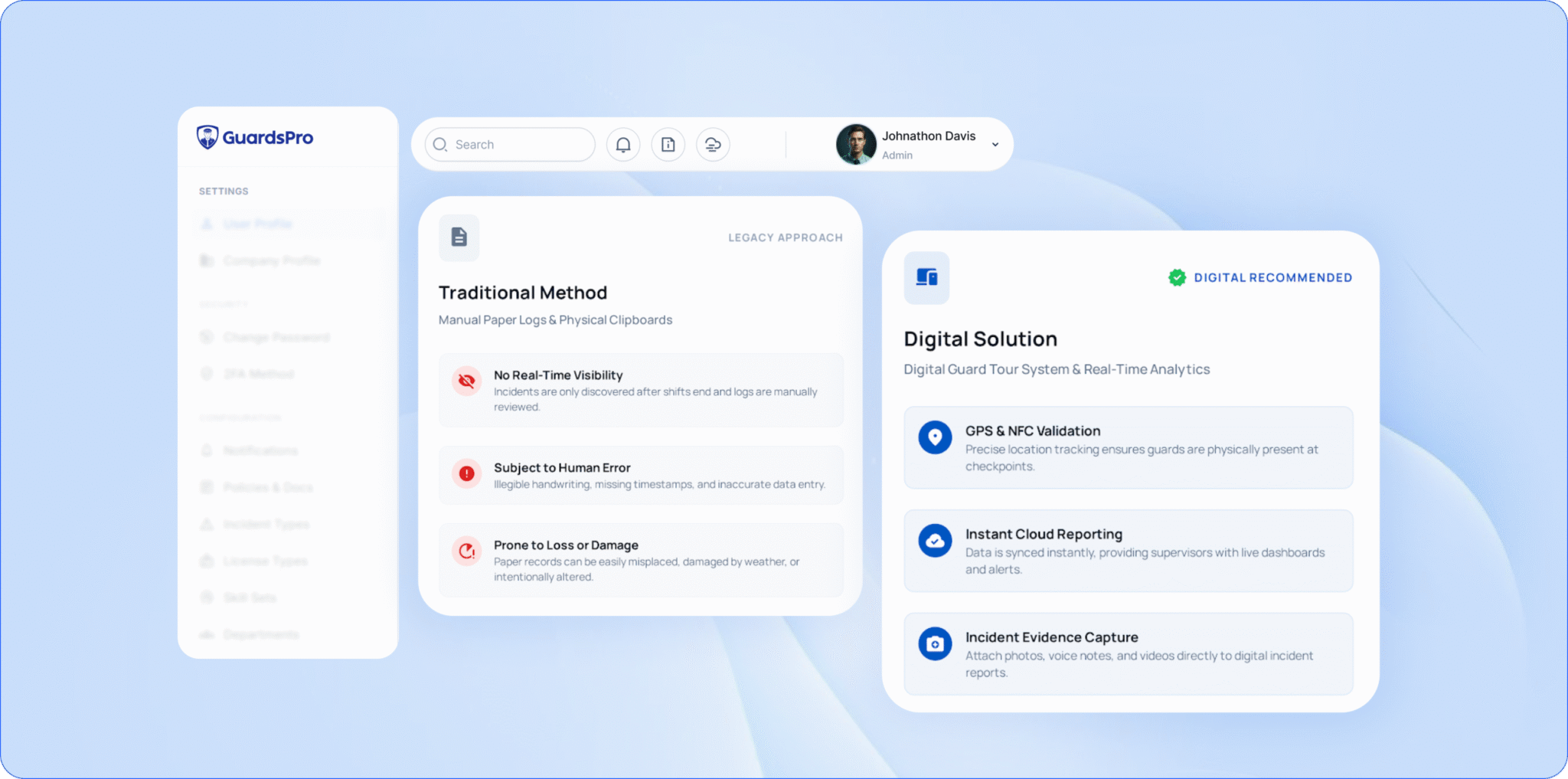 The above image is of Guardspro system and how its better than traditional system.
3. Dead Batteries and Connectivity Black Holes
Your mobile patrolling setup lives or dies on the device in your guard’s pocket. And devices die, batteries drain on long shifts, signal vanishes in remote sites, and suddenly hours of patrol data are stuck in limbo.
This is one of the most frustrating problems because it feels like the system failed, when really it’s an environment-and-hardware issue.
How to Fix It
- Choose security guard patrol software with offline mode. The app should let guards scan checkpoints, log reports, and complete tours with no signal, then auto-sync the second connectivity returns.
- Standardize on a charging routine. Issue chargers at every post, and make a battery check part of the shift handover.
- Audit your dead zones. Map the spots on each site where signal drops, and rely on offline sync and tour tags in those areas rather than live tracking.
📌 Key Takeaway: A patrol tour system that only works with a strong signal isn’t a reliable system. Offline-first is non-negotiable for real-world patrols.
4. Guards Resisting the Technology
Here’s the problem nobody likes to admit. You can buy the most advanced guard patrol system on the market, but if your officers find it clunky, confusing, or threatening, they’ll find ways around it. Phantom check-ins. “Forgotten” devices. Bare-minimum compliance.
Adoption is where a lot of rollouts quietly die.
How to Fix It
- Pick an app guards actually like using. If logging an incident takes ten taps, it won’t get done. Simplicity drives adoption more than any feature list.
- Frame it as protection, not surveillance. A guard tour system protects your officers too it’s their alibi when a client makes a false claim. Sell them on that.
- Train short, train often. A 15-minute walkthrough beats a 2-hour seminar nobody remembers. Reinforce with quick refreshers when you add features.
💡 Pro Tip: Bring a couple of your most experienced guards into the rollout early. When veterans champion the tool, the rest of the team follows.
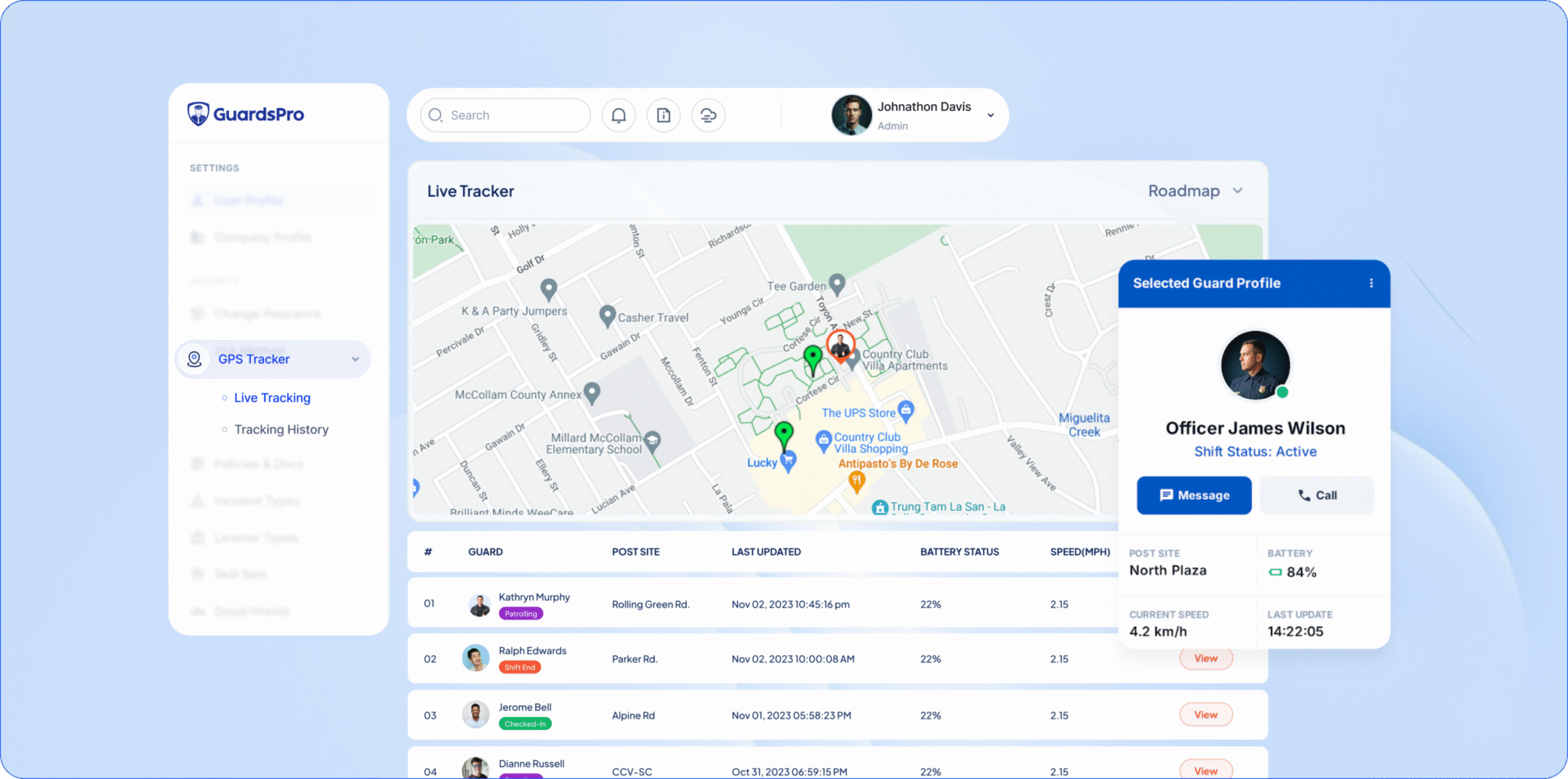 The above image is of Guardspro system and how its easy to track guards and activities.
5. Drowning in Data, Starving for Insight
You’re collecting thousands of check-ins, reports, and tour logs every week. So why does it still take half a day to answer a simple question like “how many incidents did we have at this site last month?”
Raw data isn’t the same as useful information. Plenty of teams running a capable security guard patrol software still make decisions on gut feeling because the reporting is buried or scattered.
How to Fix It
- Centralize everything on one dashboard. Tours, incidents, daily activity reports, time clock it should all live in one place, not five spreadsheets.
- Use analytics and custom reports. Filter by client, site, guard, or date so you can spot trends and back up your billing with hard numbers.
- Automate the recurring reports. The weekly client summary shouldn’t eat an afternoon. Set it once, let it generate itself.
| What You’re Doing Now | What It Should Look Like |
| Manually compiling reports from notes | Auto-generated reports from live data |
| Guessing which sites have issues | Analytics flagging problem sites instantly |
| Hunting through paper logs | Searchable, filterable cloud records |
| Finding out about incidents next day | Real-time incident notifications |
6. No Real-Time Visibility for the Back Office
By the time a paper-based or delayed system tells you something went wrong, it’s already history. A guard didn’t show. An incident escalated. A client site sat uncovered for an hour. You needed to know then not at the morning debrief.
Lack of live visibility turns your back office into reporters of the past instead of managers of the present.
How to Fix It
- Demand live tracking and instant alerts. The right guard patrol tour system shows you who’s checked in, who’s late, and where everyone is right now.
- Set up notifications for the events that matter. Missed clock-ins, incident reports, geofence violations. Don’t drown in alerts; tune them to the stuff that needs action.
- Empower your dispatcher. When a call comes in, your dispatcher should see available guards and assign in seconds, not scramble through a phone tree.
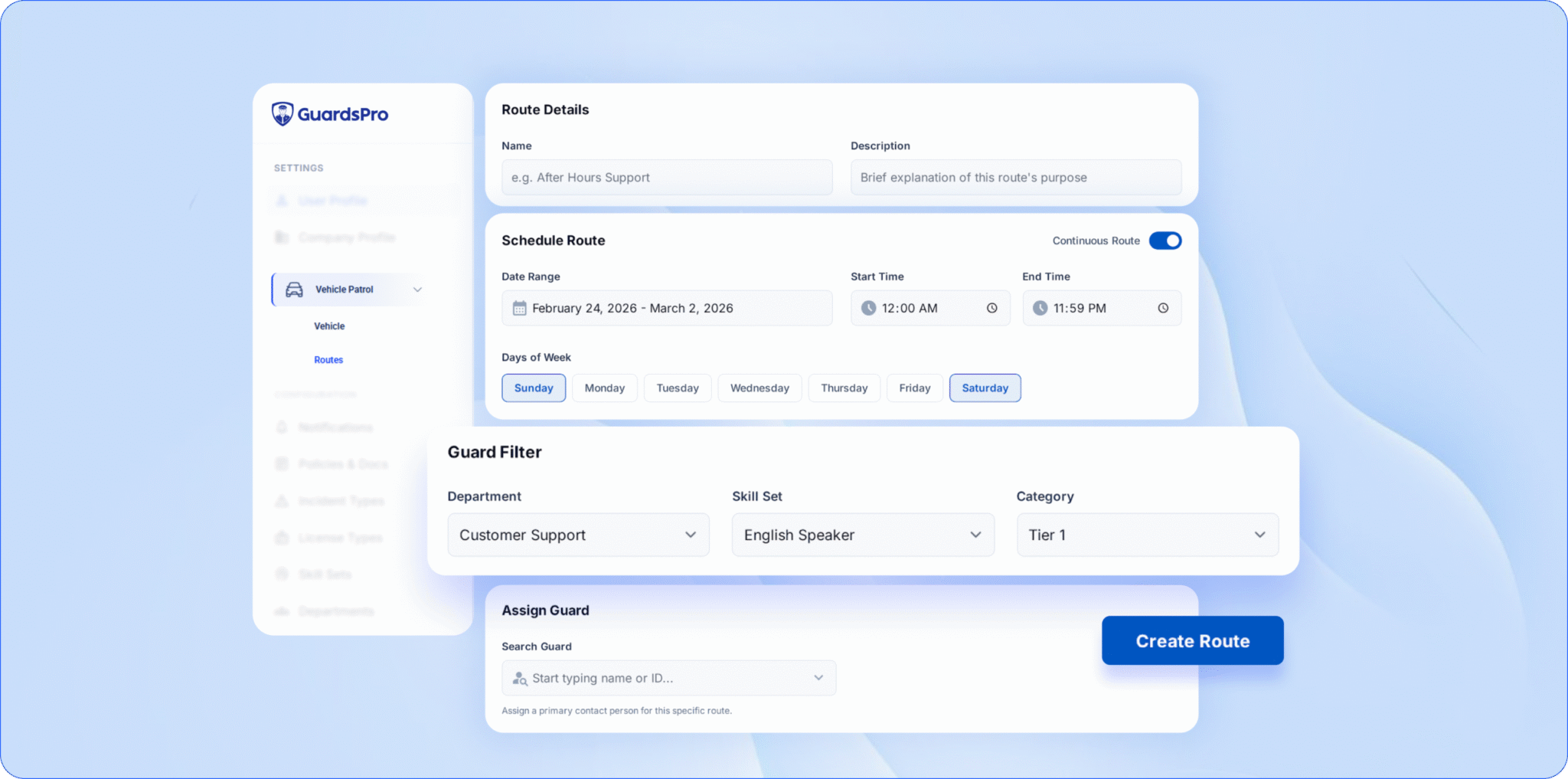 The above image is of Guardspro system and how its easy to schedule patrols and the individuals can see it live.
7. The System Can’t Scale (or Share) With You
You signed five new contracts. Congrats and now your guard tour system is buckling. Adding sites is a headache, onboarding guards takes forever, and clients keep calling for updates because there’s no way to show them the data themselves.
A system that works for 10 guards but chokes at 100 isn’t a long-term partner. Neither is one that keeps your clients in the dark.
How to Fix It
- Choose cloud-based security guard patrol software. Cloud platforms scale with you add sites, guards, and clients without new hardware or painful migrations.
- Give clients their own portal. A client web portal lets them log in and view reports, tracking history, and schedules themselves. Fewer status calls, more trust, easier contract renewals.
- Standardize your setup. Build post-order templates and report formats once so spinning up a new site takes minutes, not days.
📌 Key Takeaway: The best guard patrol system grows quietly in the background. If scaling feels like a crisis every time you win business, the tool not your success is the bottleneck.
Quick Recap: The 7 Problems and Their Fixes
- GPS drift → Pair tracking with tour tags and geofencing
- Missed checkpoints → Guided tours plus real-time alerts
- Dead batteries and dead zones → Offline mode and charging routines
- Guard resistance → A simple app and the right framing
- Data overload → One dashboard with smart analytics
- No live visibility → Real-time tracking and tuned notifications
- Can’t scale → Cloud software and a client portal
Notice a theme? Almost every fix comes back to choosing a guard tour system built for the messy reality of field work and then building good habits around it.
Frequently Asked Questions
Q: What is a guard tour system?
A: A guard tour system is software that tracks and verifies security patrols. It uses a mobile app, GPS, and checkpoint tags (QR or NFC) to confirm guards visited the right locations, completed their tours, and logged incidents. It gives security companies proof of service and real-time oversight of their teams.
Q: Why does my guard tour system show inaccurate GPS locations?
A: GPS drift is usually caused by tall buildings, dense tree cover, or indoor environments that block satellite signals. It can also stem from low-accuracy device settings or denied location permissions. The fix is to combine GPS with QR/NFC checkpoint scans and geofencing so presence is verified even when coordinates wander.
Q: Can a guard tour system work without internet?
A: Yes but only if it has an offline mode. Quality security guard patrol software lets guards scan checkpoints, complete tours, and log reports with no signal, then automatically syncs the data once connectivity returns. Offline capability is essential for remote sites and connectivity black holes.
Q: How do I get my security guards to actually use the system?
A: Choose an app that’s genuinely easy to use, frame the tool as protection for guards (not just surveillance), and run short, frequent training sessions. Getting your most experienced officers on board early helps the rest of the team adopt it faster.
Q: What’s the difference between a guard tour system and mobile patrolling?
A: Mobile patrolling refers to the practice of officers patrolling on foot or by vehicle using mobile devices. A guard tour system is the software that powers and verifies that activity tracking location, confirming checkpoints, and centralizing reports. In short, mobile patrolling is the what, and the guard tour system is how you prove it.
Stop Patching Problems. Start Preventing Them.
Most guard tour system headaches come down to two things: the wrong tool, or good tools used the wrong way. Fix both, and patrols stop being a source of client complaints and start being your strongest selling point.
That’s exactly what GuardsPro is built for: live tracking, geofencing, guided site tours, offline reporting, real-time alerts, and a client portal, all on one cloud platform that scales as you grow. If any of the seven problems above hit a little too close to home, it might be time to see what a system built for real-world patrols feels like.
Want a walkthrough instead?
Book a live demo and discover how GuardsPro supports everything from scheduling and dispatch to mobile reporting.
Got feedback or questions?
Reach out to us anytime—we’d love to hear from you. Your feedback helps us improve and better support teams like yours.