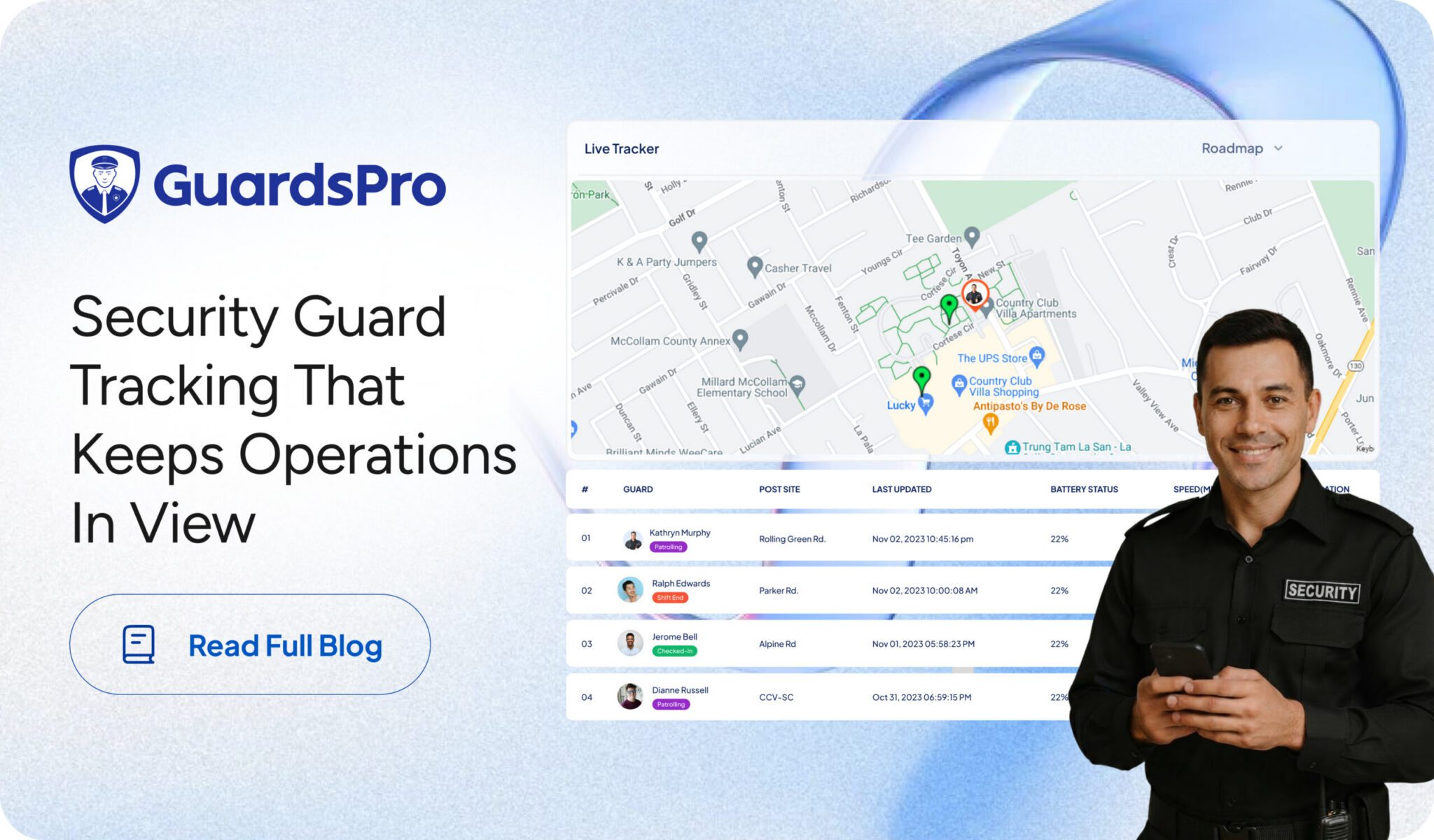
When security guards are working across different sites, supervisors cannot be everywhere at once.
One guard may be patrolling a property while another is starting a shift miles away. Managers still need to know whether guards are at their assigned locations, whether patrols are being completed, and whether anything in the field needs attention.
Relying on phone calls, paper logs, or end-of-shift updates makes that visibility difficult.
A security guard tracking system gives managers a clearer view of what is happening in the field. Using GPS, geofencing, tracking history, mobile apps, patrol activity, attendance records, and other operational information, security companies can monitor current guard activity and review what happened earlier when needed.
With GuardsPro, tracking becomes part of a broader security management workflow, helping managers connect location information with patrols, attendance, reports, and day-to-day field operations.
What Is a Security Guard Tracking System?
A security guard tracking system is a digital solution that helps security companies monitor guard locations and activities while guards are working in the field.
Typically, guards use a mobile application while supervisors access information through a centralized back-office dashboard.
Depending on the features being used, managers can see guard locations, review shift and attendance activity, monitor patrols, verify checkpoints, access incident reports, and review previous location and activity records through tracking history.
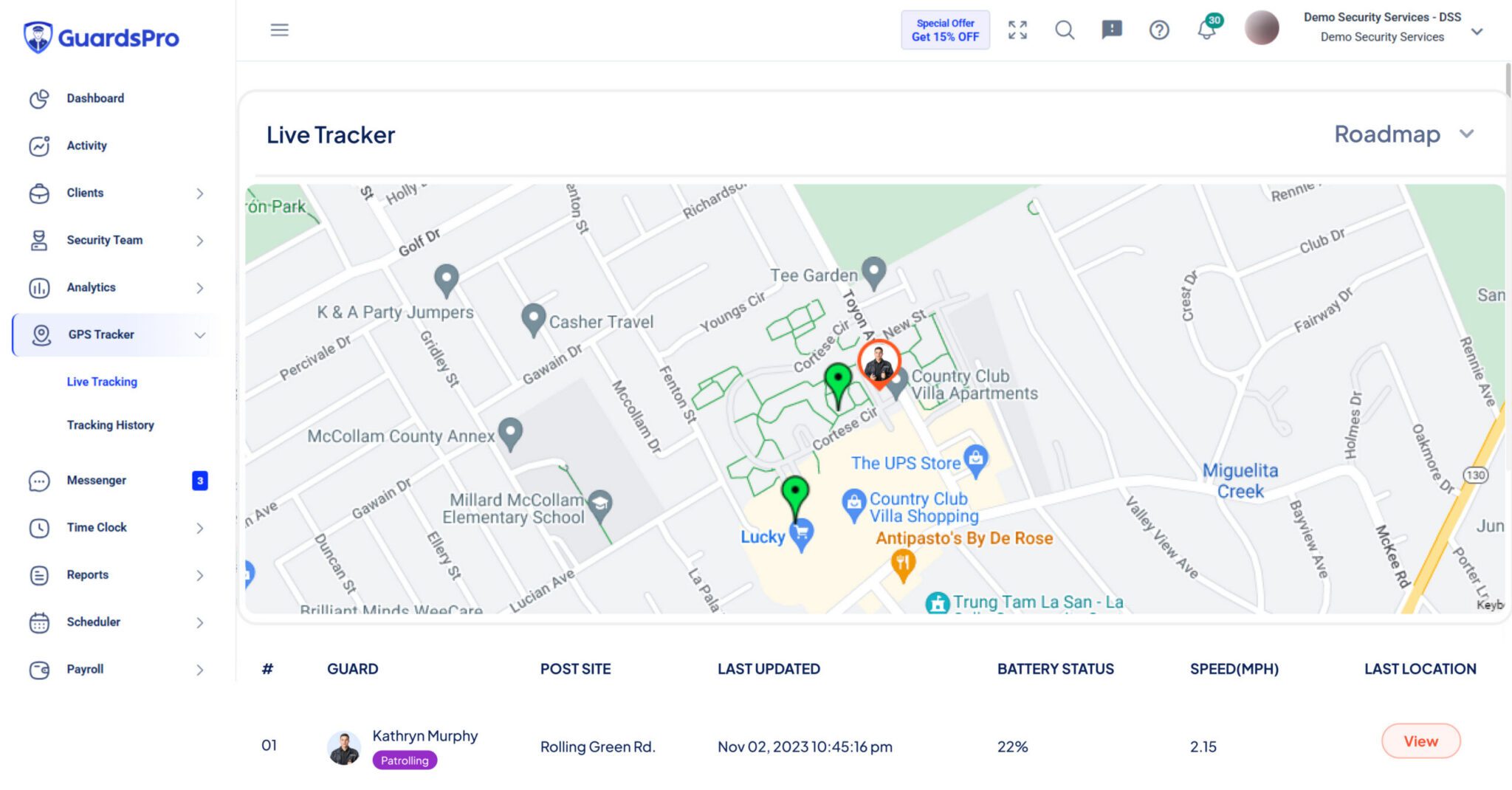
GPS and geofencing add important location context. While GPS provides information about where a guard is, geofencing uses defined location boundaries to support location-based controls around assigned sites.
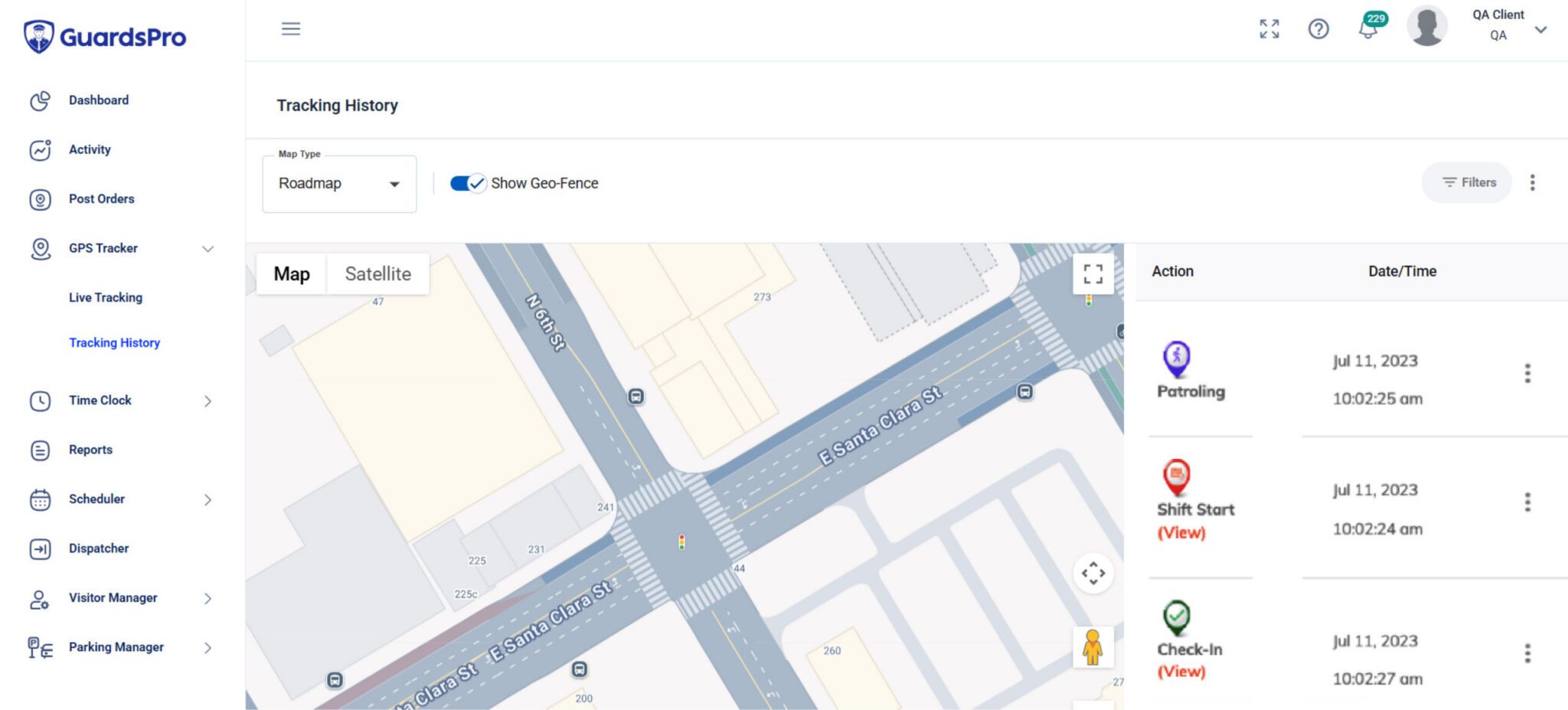
Tracking history adds the time dimension. It allows supervisors to look back at previous guard locations and activities when they need to verify service, investigate an incident, or better understand what happened during a particular shift.
Together, these capabilities give supervisors a clearer picture of both current and past field operations.
How Does Security Guard Tracking Work?
Most modern tracking systems connect a security guard tracking app used in the field with a dashboard used by managers.
When tracking is enabled, GPS technology can provide information about a guard’s location during a shift. Geofencing can add another layer by using predefined boundaries around client sites to support location-based attendance and operational controls.
At the same time, the mobile app can capture relevant operational activity such as attendance, patrols, and reports.
That information becomes available to supervisors through the dashboard, giving them greater visibility without having to repeatedly contact individual guards.
And that visibility does not necessarily end when the shift does.
Tracking history allows managers to review previous guard locations and activities when they need to look back at a shift. For example, a supervisor investigating an incident can review available historical information alongside patrol and reporting records to gain more context about what happened.
With GuardsPro, real-time tracking, geofencing, and tracking history work alongside other security management tools, making location information part of the wider operational picture rather than an isolated tracking feature.
Why Real-Time Tracking and Tracking History Both Matter
Security managers need visibility into what is happening now—but they also need a reliable way to look back.
Real-time guard tracking helps supervisors understand current field activity. If something requires attention during a shift, managers have more up-to-date information to work with instead of waiting for an end-of-shift report.
Tracking history, on the other hand, becomes valuable when questions arise afterward.
Where was the guard at a particular time? What activity took place during the shift? Does the available location information support what was reported? What happened before or after an incident?
Having access to both current and historical information gives supervisors a more complete view of field operations.
For security companies, that can support better accountability, faster responses, stronger service verification, and more consistent oversight across client locations.
The purpose of tracking is not simply to watch guards on a map. It is to give managers useful information when they need it, during the shift and after it.
Connect GPS, Geofencing, Patrols, and Attendance
Security guard GPS tracking becomes much more useful when location information is connected with the work a guard is expected to perform.
For example, GPS may show that a guard reached a client property. Attendance records can help verify when the shift started, while guard tour tracking can show whether required patrols or checkpoints were completed.
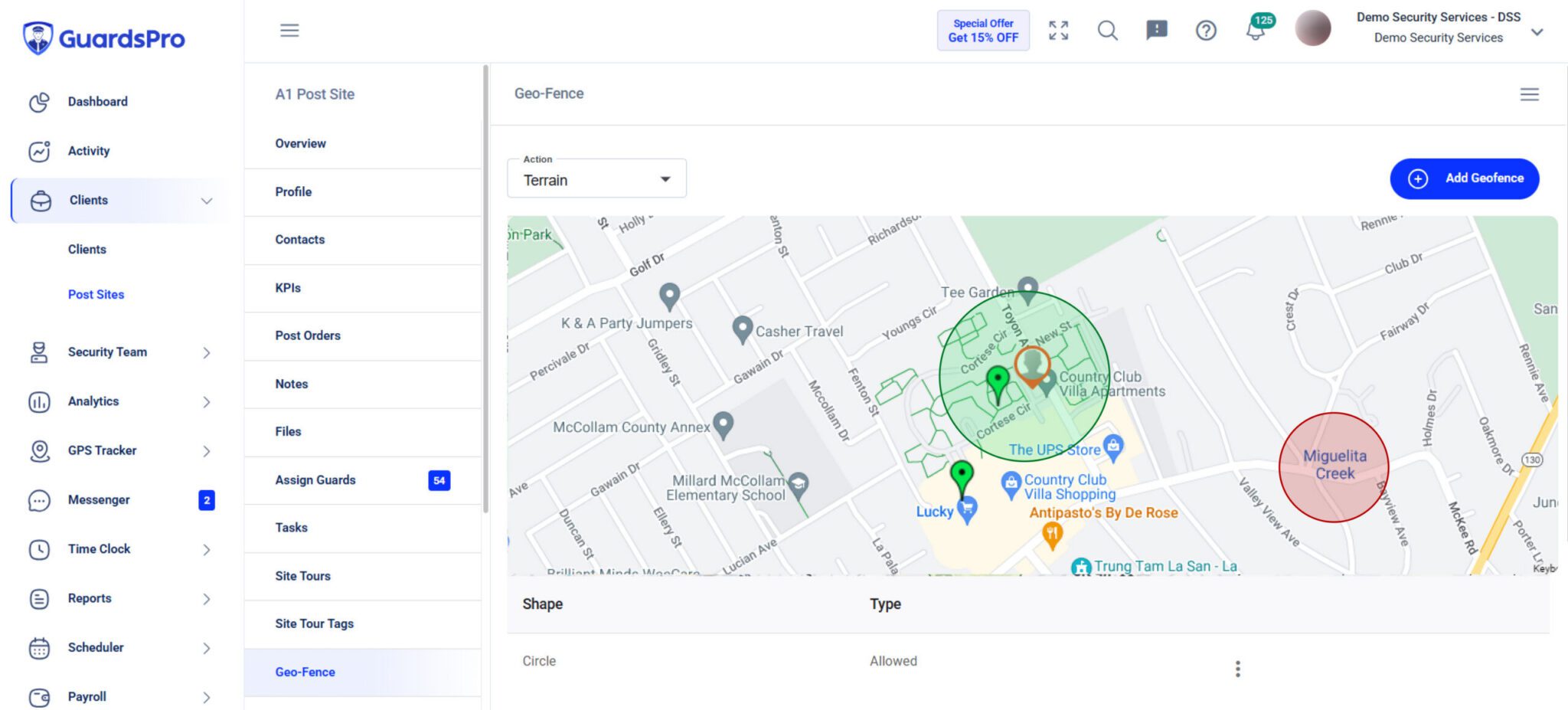
Geofencing helps connect location with attendance. By defining geographic boundaries around designated sites, security companies can apply location-based controls to clock-ins and clock-outs.
With GuardsPro, geofencing can work alongside GPS tracking to give managers greater context around guard presence at assigned locations. Learn how geofencing works in security operations and how GuardsPro can use defined site boundaries to strengthen guard tracking and accountability.
Tracking history can then provide another layer of context by allowing supervisors to review previous location and activity information when questions arise later.
With GuardsPro, managers can bring GPS tracking, geofencing, tracking history, attendance, patrol activity, site tours, and field reports closer together.
Instead of only asking “Where is the guard?”, supervisors can better understand whether the guard was at the assigned location, when they were there, what work was completed, and what happened during the shift.
Security Guard Tracking System vs. Guard Tour System
A security guard tracking system and a guard tour system are closely related, but they serve slightly different purposes.
A security guard tracking system provides broader visibility into a guard’s location and field activity, including current and historical tracking information. A guard tour system focuses more specifically on verifying that guards complete required patrol routes, checkpoints, or tour activities.
For example, GPS tracking may help establish that a guard was at the assigned property, while a security guard patrol tracking system can help verify that the required patrol was completed. Geofencing can support location-based controls around the site, while tracking history can help supervisors review previous activity when verification is needed later.
When these capabilities work together, supervisors gain both location visibility and better verification of completed duties.
GuardsPro connects these capabilities so managers can view guard tracking as part of the wider security operation rather than as an isolated location feature.
How GuardsPro Helps You Track Security Guards
GuardsPro brings security guard tracking into a broader security operations platform.
Managers can use GPS-based tracking to view guard locations, review tracking history, monitor activity across multiple sites, and connect tracking with time and attendance.
Geofencing adds location-based controls by allowing designated boundaries to be used around client sites. This can support more accurate attendance processes by helping ensure location requirements are considered when guards clock in or out.
When supervisors need to look back, GuardsPro’s tracking history can provide previous location and activity information to help review a shift, investigate an incident, or verify service.
The platform also brings patrol and site tour activity, field reports, and other operational information into the broader workflow.
Guards use the GuardsPro Mobile App in the field, while supervisors use the back-office dashboard to monitor relevant activity and manage operations.
This gives managers a clearer view of the questions that matter:
-
Is the guard at the assigned site?
-
Did the shift start as expected?
-
Are required patrols being completed?
-
Where was the guard earlier in the shift?
-
Has anything important been reported?
-
What happened during the shift?
GPS shows where guards are, geofencing adds site context, tracking history helps managers look back, and operational records provide more information about what happened during the shift.
What to Look for in Security Guard Tracking Software
Not every tracking solution works the same way. The right system should fit the realities of managing security teams in the field.
Look beyond basic GPS location. Consider whether supervisors can see current activity and review tracking history when they need to investigate past events or verify service.
Geofencing is another important capability, particularly when companies want to apply location-based controls around client sites. Patrol verification, mobile access, attendance integration, and multi-site visibility should also be considered.
Most importantly, look at how these capabilities work together.
A system becomes more useful when real-time tracking, tracking history, GPS, geofencing, attendance, patrols, reporting, scheduling, and communication contribute to the same operational picture instead of becoming separate processes for supervisors to manage.
That connected approach is what GuardsPro is designed to provide.
Better Tracking Means Better Visibility
A security guard tracking system should provide more than a dot on a map.
It should help security companies understand what is happening in the field, look back at what happened earlier, verify service, maintain accountability, and respond when something needs attention.
Real-time tracking shows what is happening now. Tracking history helps explain what happened before. GPS provides location information. Geofencing adds location-based context. Patrol and attendance records show how that location connects with the guard’s actual responsibilities.
Bringing those pieces together creates a much more useful picture of field operations.
GuardsPro connects these capabilities as part of a broader security management platform, helping managers see not only where guards are, but also where they have been and what has happened across their shifts and client sites.
Get Better Visibility With GuardsPro
Whether you manage a few guards or teams spread across multiple client sites, GuardsPro helps you stay connected to field operations.
Monitor guard activity in real time, review tracking history, use GPS and geofencing for greater location visibility, monitor patrols, manage attendance, access reports, and oversee security operations from one platform.
Start your free 30-day trial of GuardsPro today and see how greater field visibility can simplify security management.
Sign up within 15 days to unlock an exclusive 15% discount on your subscription.
Have questions or feedback? Get in touch anytime.
FAQs
What is a security guard tracking system?
A security guard tracking system is software that helps security companies monitor guard locations and activities using tools such as GPS, geofencing, tracking history, mobile applications, attendance records, and patrol tracking.
What is tracking history in security guard tracking software?
Tracking history allows supervisors to review previous guard location and activity information. It can provide useful context when verifying service, reviewing a past shift, or investigating an incident.
What is the difference between real-time tracking and tracking history?
Real-time tracking provides visibility into current guard activity, while tracking history allows supervisors to review previous location and activity information. Together, they provide visibility into both current and past field operations.
What is geofencing in security guard tracking?
Geofencing uses predefined geographic boundaries around locations such as client sites. In a security guard tracking system, it can support location-based controls, including requirements related to guard clock-ins and clock-outs.
What is the difference between GPS tracking and geofencing?
GPS tracking provides location information about where a guard is or has been. Geofencing uses defined geographic boundaries to apply location-based rules or controls around specific sites.
What is the difference between a guard tracking system and a guard tour system?
A guard tracking system provides broader visibility into guard locations and field activity, while a guard tour system focuses on verifying assigned patrol routes, checkpoints, and tour activities. GuardsPro can bring these capabilities together.