A client calls to ask whether the overnight guard completed every scheduled patrol. Another wants a copy of last week’s incident report. A third wants to know who is on duty at their property tonight.
Your operations team has every answer. The problem is that someone has to stop what they are doing, find the information and send it. Multiply those requests across dozens of clients and post sites, and client communication becomes a workload of its own.
A security guard client portal changes that. Instead of depending on calls, emails and attachments, your clients get secure access to the information about their own sites whenever they need it. This guide explains what a client portal is, how it works, what clients should be able to see and what to look for when you choose one.
Quick answer: A security guard client portal is a secure online login where your clients see authorized information about the security service at their sites: reports, guard schedules, site tours, check-ins, GPS tracking and post orders. It gives clients proof of service, cuts routine “can you send me…” requests and lets your account managers spend their time on real conversations instead of forwarding files.
What Is a Security Guard Client Portal?
A security guard client portal is a secure online platform that gives clients access to authorized information about the security services delivered at their properties or post sites.
Think about how client communication usually works. Guards complete patrols, submit reports, check in and out and document incidents. That information reaches supervisors and managers, who then share the relevant parts with the client by email or phone. A client portal makes that last step automatic. Authorized clients log in and see the data you have made available to them, without waiting for someone to send it.
Depending on the security management platform, a portal can include:
- Daily activity and incident reports
- Guard schedules and shift requests
- Site tour and checkpoint information
- Check-in, check-out, clock-in and clock-out activity
- GPS tracking information
- Post orders
- Visitor information, time logs and site notifications
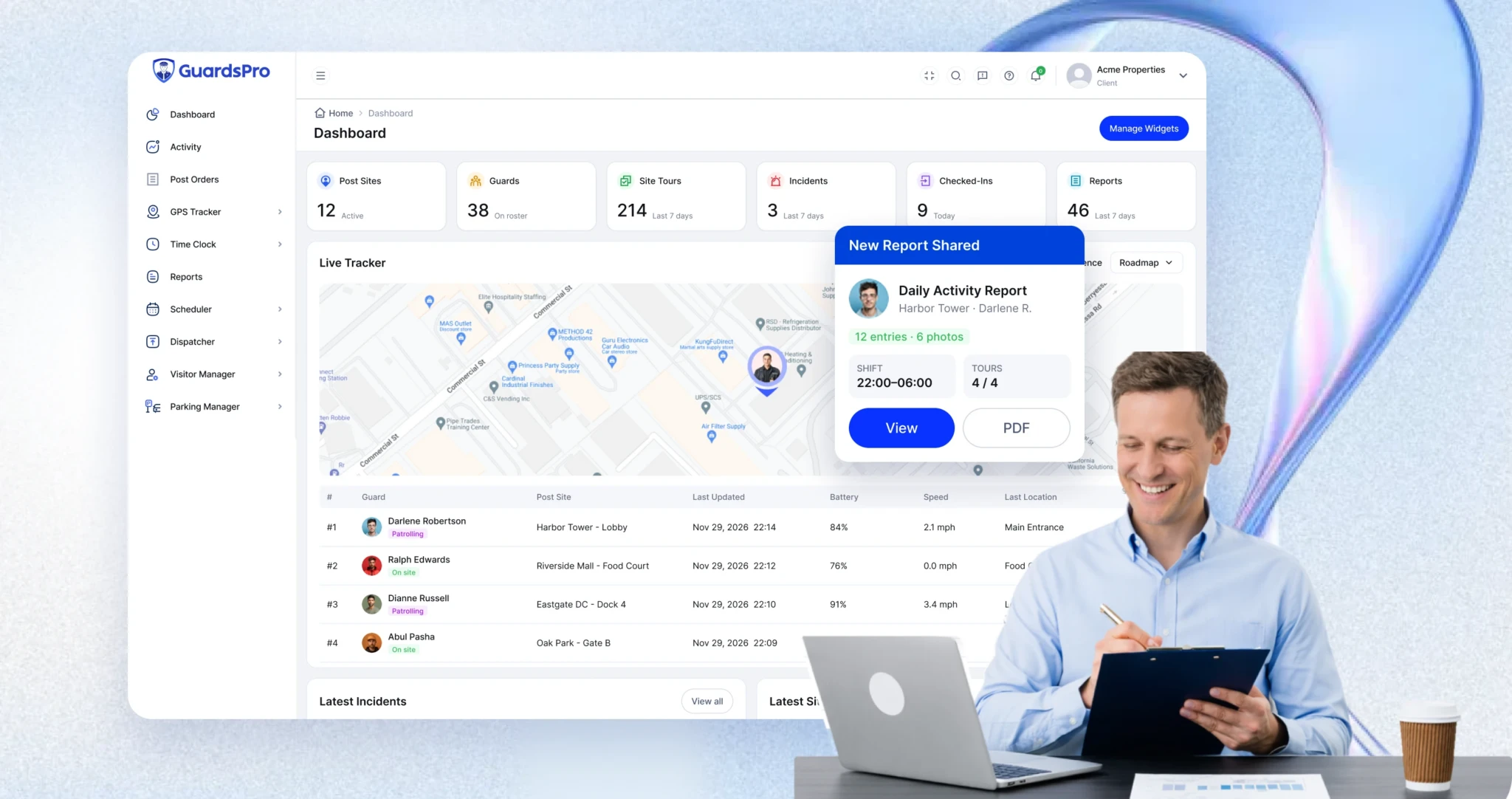
The goal is not to give clients unrestricted access to everything inside your company. It is to give them easy access to the information that matters for the service at their sites. The GuardsPro Client Web Portal is built for exactly this, connecting clients to reports, schedules, site tours, notifications and other operational information in one place.
How Does a Security Guard Client Portal Work?
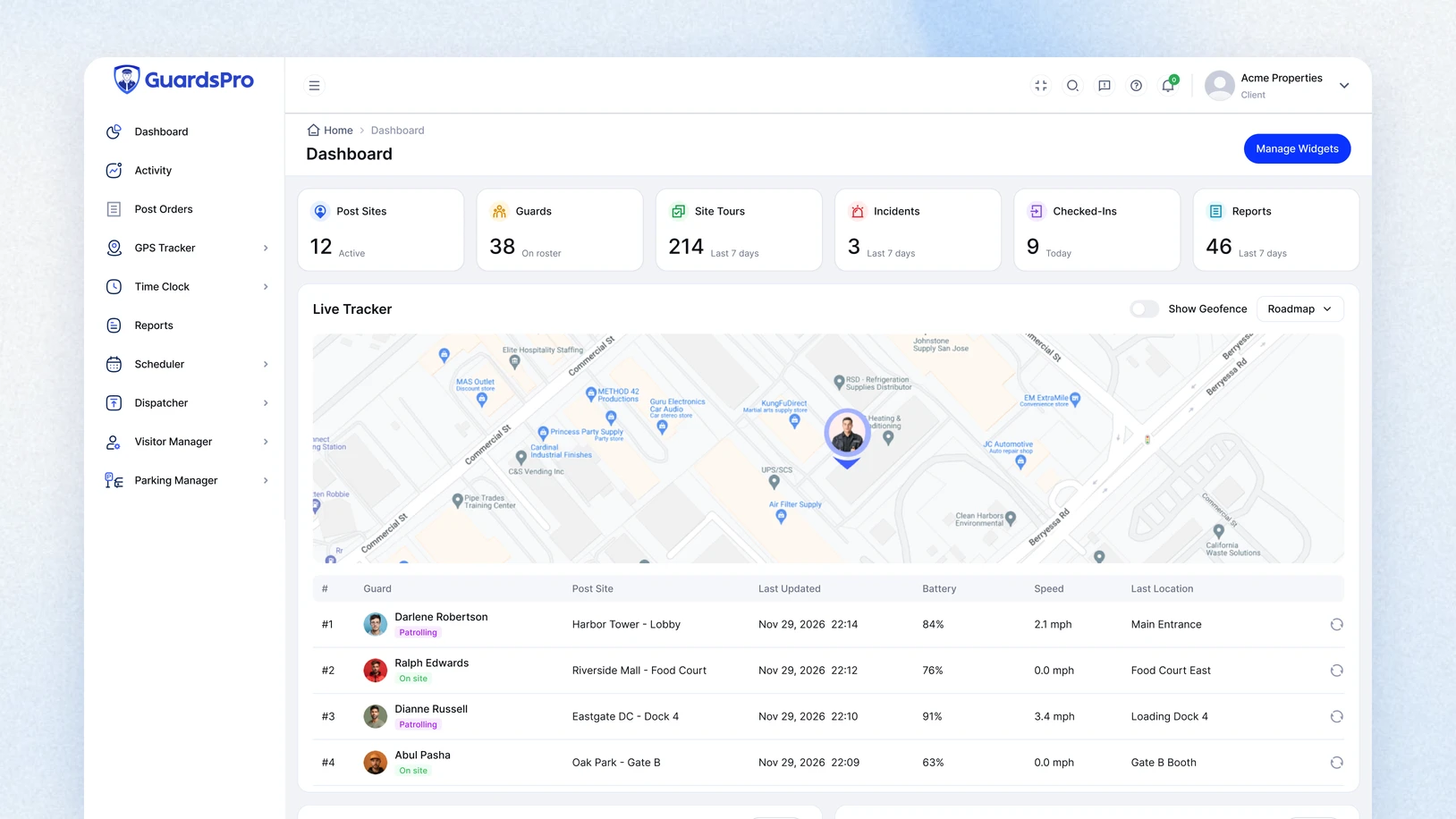
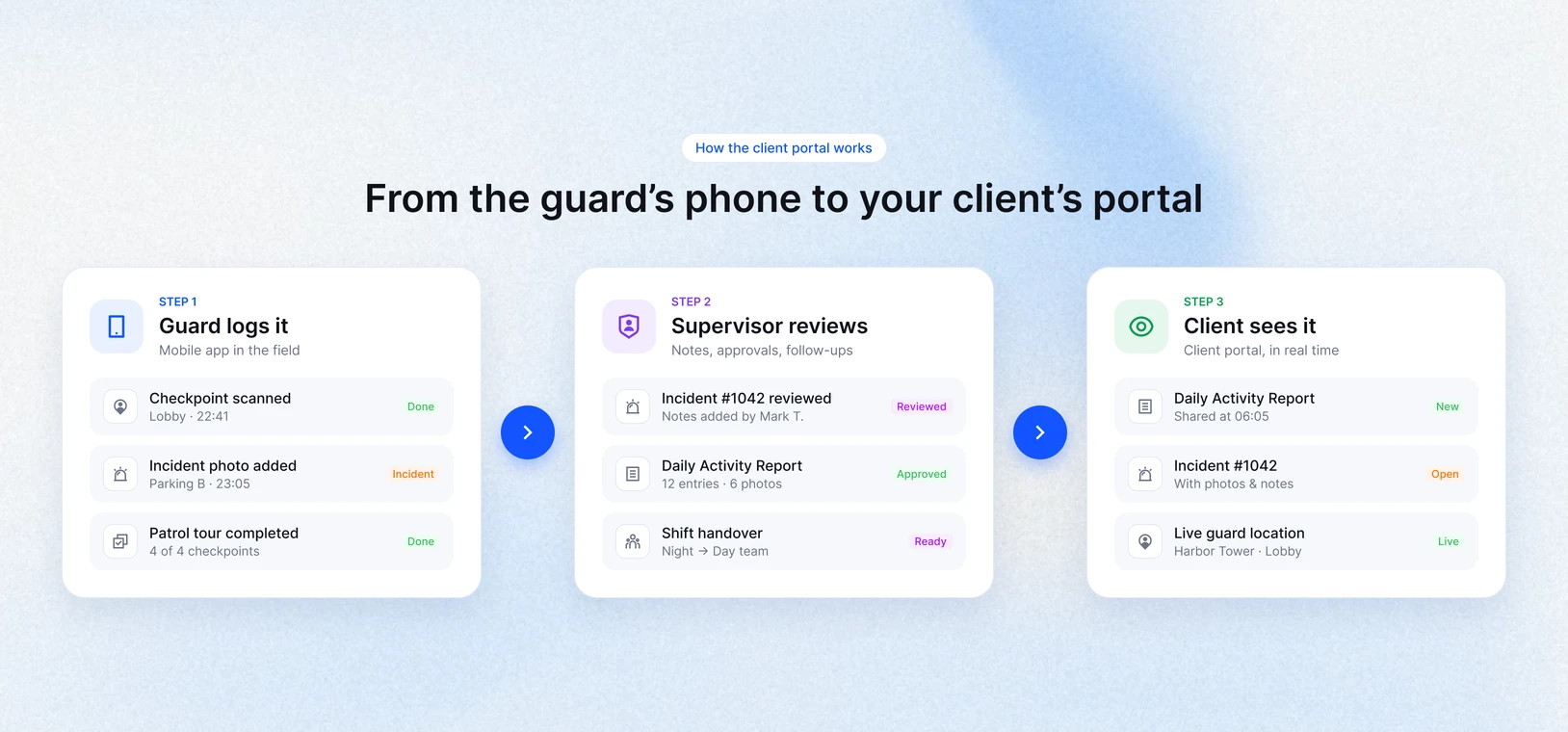
A client portal works best as part of a larger security guard management platform, not as a separate tool. Information flows through three layers:
- Guards in the field complete tours, scan checkpoints, clock in and submit reports from the guard app.
- Supervisors and managers oversee that activity and review reports in the Operations Dashboard.
- Authorized clients see the relevant, approved information in their own portal or client app.
Here is a simple example. During a night patrol at a commercial property, a guard finds a damaged entrance door and submits an incident report with photos. The supervisor reviews it. Once it is ready, the report appears in the client’s portal. The property manager does not search an email thread or ask the account manager to resend an attachment. They open the portal and read it.
Expert Tip: Keep a review step for sensitive reports. Let routine records such as tours, check-ins and daily activity reports flow to the client automatically, but have a supervisor approve incident reports before they appear in the portal.
Why Do Security Companies Need a Client Portal?
Good security work is only part of a strong client relationship. Clients also need to see and understand the service they are paying for. If guards complete every patrol but the client cannot verify it, you have a visibility problem. If incidents are documented well but reports take days to arrive, you have a communication problem. If supervisors spend hours answering questions clients could answer themselves, you have an efficiency problem. A client portal solves all three.
1. Give clients real visibility into security operations
Most security work happens out of the client’s sight. Property managers are not on site for overnight patrols, and corporate teams may oversee locations in several cities. With a portal, the client stops asking “Did the guard complete the patrol?” and checks the site tour record instead. They rely on operational records, not verbal assurances, and that builds a more transparent relationship.
2. Cut routine emails and phone calls
“Can you resend yesterday’s report?” “Who is working tonight?” “Did the guard arrive on time?” “Were all the checkpoints completed?” Each request is small. Across many clients, sites and shifts, they add up to hours every week. Self-service access removes most of this back-and-forth, so account managers can talk about service quality, coverage and improvements instead of locating and forwarding files.
3. Make reports easy for clients to find
Security companies produce a lot of documentation: daily activity reports, incident reports, hourly reports, site tour reports, task reports and check-in logs. The challenge is rarely creating it. It is making sure clients can reach it when they need it. As we covered in Security Guard Reporting Software: Why Paper Reports Are Costing Your Company Clients, outdated reporting leads to late reports, missing records and limited client visibility. Moving reports online solves part of the problem. Giving clients one place to find them solves the rest.
4. Prove accountability with operational records
Clients want confidence that the services in their contract are being delivered. Were guards present? Were tours completed? Was the incident documented? Was the site covered during the agreed hours? A guard tour system that connects scheduling, attendance and site tours creates records that answer these questions. When clients can see those records too, the conversation changes from “We completed the patrol” to “Here is the recorded activity from your site.”
5. Create a better client experience
Your guards may do excellent work, but the client’s experience also depends on how easy you are to work with. How fast can they find a report? Do they have to contact someone every time they need information? Can several people on their team get access? A portal gives clients independence. They check information on their own schedule, which matters even more for clients managing many locations or stakeholders.
6. Grow without multiplying admin work
Ten clients asking for reports is manageable. Fifty clients, each with several sites asking for reports, schedules, patrol updates and incident details, is a different job. Hiring more staff only to handle information requests is rarely the best answer. When reports, tours and schedules already live in one system, the portal lets client communication scale with the business.
Without a Portal vs With a Client Portal
| Client need | Without a portal | With a client portal |
|---|---|---|
| Copy of an incident report | Email the account manager and wait for an attachment | Open the report, with photos, as soon as it is approved |
| Proof a patrol happened | Take the company’s word for it | See the site tour record with checkpoints and times |
| Who is on duty tonight | Call the office | Check the schedule and current check-ins |
| Extra coverage for an event | Phone or email request, confirmed later | Request an additional shift in the portal |
| Last month’s records for a review | Someone builds a folder of PDFs | Browse historical reports and activity by date |
| Access for a new team member | Add them to more email threads | Give them their own login with the right permissions |
What Should Clients Be Able to Access?
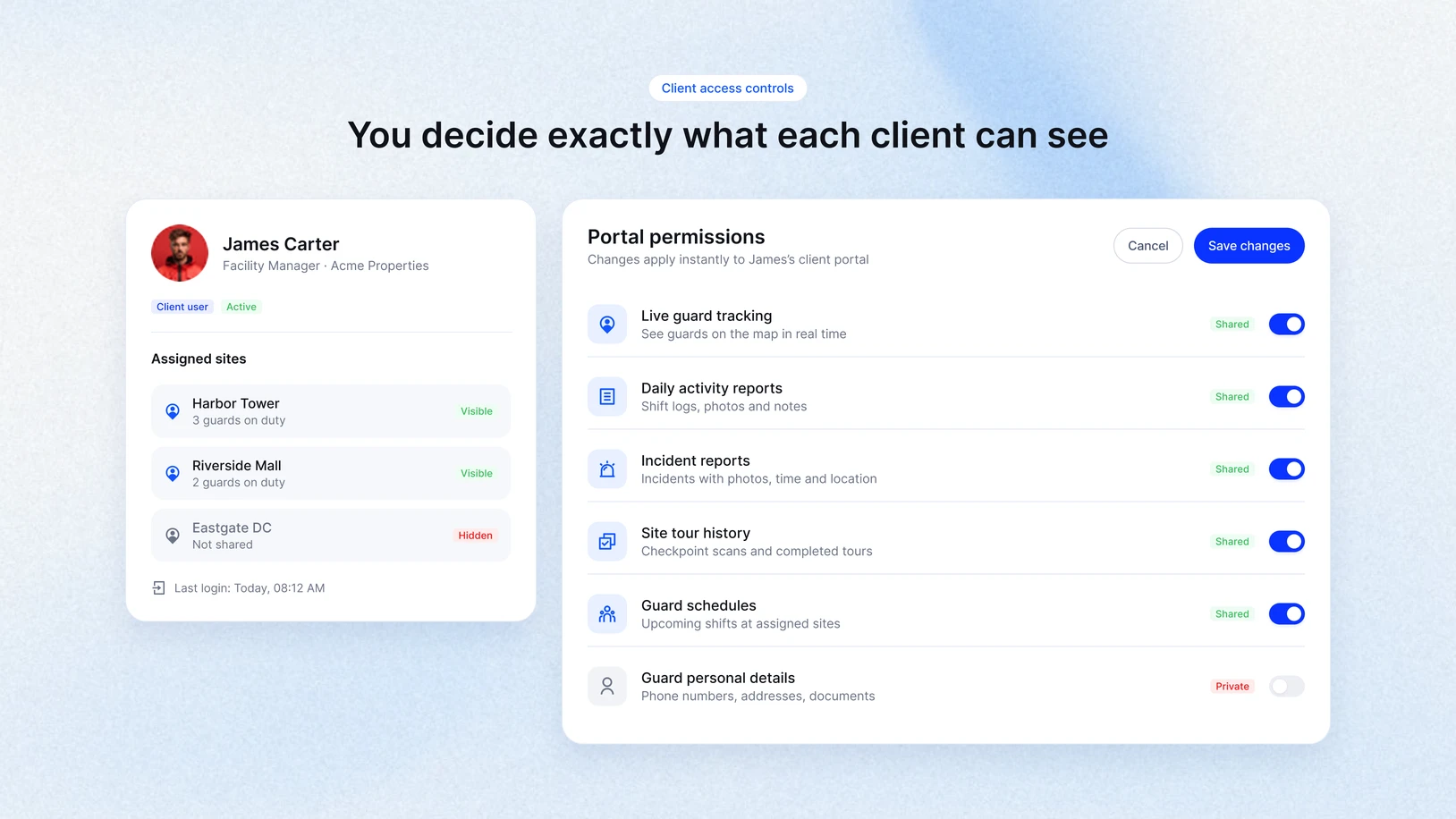
Not every client needs the same information. A good portal gives useful visibility while letting you control permissions. These are the areas that make a portal valuable.
| What the client sees | Why it matters to them |
|---|---|
| Security reports | Daily activity, incident, hourly and site tour reports are the clearest record of what happened, now and in the past. |
| Guard schedules | Reassurance that the site is covered. In GuardsPro, clients can also request additional shifts for special coverage. |
| Guard activity | Check-ins, check-outs, clock-ins, completed tours and submitted reports show what is actually happening, not just who should be there. |
| Site tour information | Completed and missed tours, duration and checkpoints make patrols easy to verify without a supervisor preparing an update. |
| Tracking information | Location context for guard activity. GuardsPro GPS tracking can be shared through client-facing tools. |
| Post orders | A shared understanding of the procedures and expectations for each site. |
| Visitor and site information | A broader view of activity at the property when your team also manages visitors and vehicles. |
Expert Tip: Start each new client with reports, site tours and schedules. Add GPS tracking, post orders and visitor data once they are comfortable. A portal that is focused on what the client actually checks gets used far more than one that shows everything.
How a Client Portal Changes Client Communication
A client portal should not replace conversations between you and your clients. It should improve them. A serious incident, a service concern, a staffing change or a performance review still deserves a direct conversation, not a dashboard notification.
Routine information is different. When clients can answer basic questions themselves, meetings stop being about tracking down reports and start being about the patterns in those reports. Instead of confirming whether patrols happened, you discuss how to improve the patrol plan. The portal provides the information. Your team provides the expertise.
What to Look For in a Security Guard Client Portal
Many tools offer a “client login”. Fewer give clients something they will actually use. Look for these capabilities:
Secure, permission-based access
Each client sees only their own organization and sites, with permissions you control.
Reports and history
Current and historical reports with photos, easy to search and download.
Guard activity and site tours
Check-ins, completed and missed tours and checkpoint records for proof of service.
Schedules and shift requests
Planned coverage at a glance, plus a simple way to ask for extra shifts.
Multiple users and mobile access
Several people on the client’s team can log in, on the web or a client mobile app.
Built into your platform
Data flows from the guard app and dashboard, so nobody copies records into a separate system.
Integration matters most. If your staff must copy information from the management system into a separate portal, you have only created another admin task. Cost and scalability count too: you can review GuardsPro pricing and modules to see how the portal fits with the rest of your operation.
Expert Tip: Use the portal to win business, not only to serve it. Show a live demo of the client view in sales meetings and contract renewals. Prospects can see exactly what proof of service they will get from you.
How GuardsPro Keeps Clients Connected
GuardsPro includes a dedicated Client Web Portal and a Client App as part of one security management platform. Depending on enabled modules and permissions, clients can see reports, schedules, post orders, site tours, guard monitoring, visitor and vehicle information and other operational data. You keep control over client access, and clients can manage access for multiple authorized users where applicable.
| Client question | Where the answer comes from in GuardsPro |
|---|---|
| “Can you send me the incident report?” | Incident and daily reporting with photos, visible in the Client Web Portal |
| “Did the guard complete every patrol?” | Site tours with checkpoints from the Guard Mobile App |
| “Where was the guard at 2 a.m.?” | GPS tracking and check-in history |
| “Who is working tonight?” | Scheduler, with client shift requests for extra coverage |
| “What are the guards supposed to do here?” | Post orders attached to each site |
| “Can my facilities team see this too?” | Multiple client users with their own logins, on the web or the Client App |
The flow stays connected from end to end. Guards document work in the field, managers oversee it in the Operations Dashboard and clients get the right visibility through client-facing tools. You can explore how the pieces fit together in the full list of GuardsPro features and product capabilities.
Still running client updates from spreadsheets and email? See the signs it is time to switch to security management software.
The Bottom Line
Strong client communication should not mean manually sending every report, answering every routine status question or digging for records each time a client asks. A security guard client portal gives clients a clear window into the service they pay for, while your team keeps oversight and control.
Clients get transparency and easy access. Operations teams get fewer interruptions. Account managers get time for meaningful conversations. And as your company grows, client communication grows with it instead of against it.
Ready to give clients visibility without more work? GuardsPro brings reporting, guard activity, schedules, tracking, site tours, post orders and the Client Web Portal into one platform. Start your free 30-day GuardsPro trial, book a demo or contact the GuardsPro team with your questions.
Frequently Asked Questions
What is a security guard client portal?
It is a secure online platform that gives a security company’s clients access to authorized information about their sites and security services, such as reports, schedules, guard activity, patrol records, tracking history and post orders.
Why do security companies need a client portal?
A client portal improves transparency, reduces repetitive client requests, makes security information easier to access and helps companies prove the services delivered at client sites. It also lets client communication scale as the business grows.
What information can clients see in a security guard client portal?
It depends on the software, enabled modules and permissions. It can include incident and daily activity reports, guard schedules, check-in and check-out activity, site tour records, GPS tracking, post orders, visitor information and time records.
Can a client portal show whether guards completed their patrols?
Yes, with a security management system that records site tours. Clients can see completed and missed tours, checkpoints and times, which gives them direct visibility into patrol activity.
Is client portal access secure?
A good client portal uses controlled user access and permissions, so each client sees only information about their own organization and sites. Review the access controls of any platform before you choose it.
Does a client portal replace account managers?
No. The portal handles routine information, while account managers still discuss performance, concerns, incidents, changing requirements and the overall relationship. The portal frees their time for those conversations.
Does GuardsPro have a client portal?
Yes. GuardsPro provides a Client Web Portal that gives authorized clients access to security information based on enabled features and permissions, plus a Client Mobile App for checking the same information on the go.