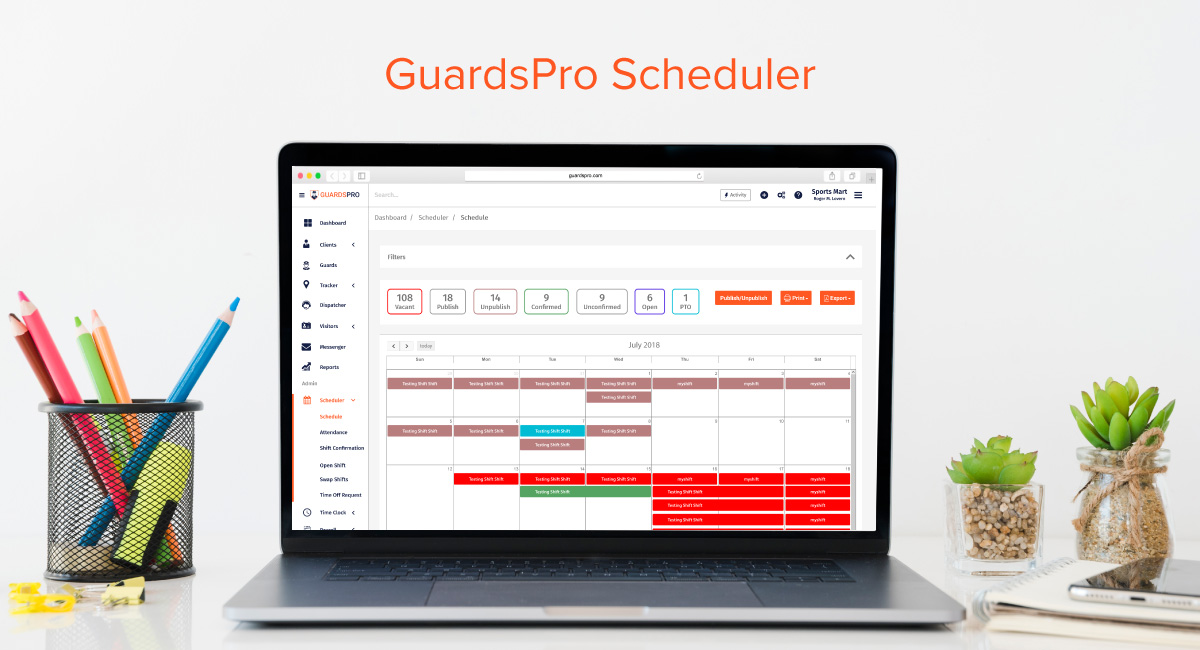
Scheduling security guards is one of the most important—and time-consuming—responsibilities in running a security company.
Every shift needs the right guard, every site needs adequate coverage, and schedule changes need to be communicated quickly. A single mistake can result in an uncovered post, unnecessary overtime, payroll discrepancies, or an unhappy client.
For small security teams, managing schedules with spreadsheets, paper calendars, phone calls, and group messages may seem manageable.
But as a security company grows from a few guards and sites to dozens or hundreds of officers across multiple locations, manual scheduling becomes increasingly difficult.
That’s where security guard scheduling software can make a significant difference.
Modern scheduling platforms don’t simply put guards on a calendar. They can help security companies manage availability, assignments, shift changes, overtime, time off, attendance, notifications, and workforce data from a centralized system.
This guide explores the biggest benefits of security guard scheduling software and explains how the right system can help security companies improve efficiency, coverage, accountability, and profitability.
What Is Security Guard Scheduling Software?
Security guard scheduling software is a digital workforce-management solution designed to help security companies create, manage, update, and monitor employee schedules.
Unlike a basic calendar or spreadsheet, purpose-built security scheduling software can connect scheduling with other parts of security operations.
Depending on the platform, this can include:
- Guard availability
- Shift assignments
- Multiple client sites
- Shift changes
- Time-off requests
- Overtime
- Attendance
- Notifications
- Time tracking
- Payroll data
- Guard qualifications
- Patrol information
- Reporting
- Client requirements
The objective is simple:
Put the right guard at the right site at the right time—while reducing the administrative work required to make it happen.
Why Traditional Security Guard Scheduling Becomes Difficult
Manual scheduling doesn’t necessarily fail immediately.
The problems usually appear as the company grows.
A supervisor may start with a spreadsheet containing:
| Guard | Site | Date | Start | End |
|---|---|---|---|---|
| Guard A | Site 1 | Monday | 8 AM | 4 PM |
| Guard B | Site 2 | Monday | 4 PM | 12 AM |
| Guard C | Site 3 | Monday | 12 AM | 8 AM |
That works until the operation starts changing.
A guard calls out.
Another guard requests leave.
A client needs additional coverage.
Someone is approaching overtime.
Two guards are accidentally assigned to the same shift.
A replacement has not received the updated schedule.
Suddenly, the spreadsheet isn’t the schedule anymore.
The schedule is now spread across:
Spreadsheet + phone calls + text messages + emails + memory.
That’s where mistakes become much more likely.
Modern security scheduling software addresses this by centralizing the schedule and making changes visible to the people who need to know about them. GuardsPro itself identifies manual coordination, uncovered shifts, double bookings, overtime disputes, and outdated schedule information as common problems with spreadsheet-based scheduling.
12 Benefits of Security Guard Scheduling Software
1. Save Hours of Administrative Work
One of the biggest benefits is simply saving time.
Without scheduling software, supervisors may spend hours:
- Building weekly schedules
- Checking guard availability
- Calling employees
- Finding replacements
- Updating spreadsheets
- Sending schedule changes
- Checking overtime
- Resolving conflicts
- Answering schedule questions
A digital system centralizes these activities.
Instead of repeatedly rebuilding schedules, managers can create recurring assignments, update shifts, and communicate changes from one platform.
EasyRoster highlights scheduling automation, digital scheduling, overtime management, clocking integration, and faster schedule creation as major sources of time savings.
The real benefit
Managers spend less time maintaining the schedule and more time managing the operation.
2. Reduce Uncovered Security Shifts
An uncovered security post is more than a scheduling inconvenience.
It can mean a client property is left without the coverage promised in the contract.
Scheduling software helps managers see:
- Open shifts
- Assigned guards
- Coverage requirements
- Schedule conflicts
- Availability
- Upcoming changes
This makes it easier to identify gaps before they become operational problems.
For security companies, this is one of the most important benefits of moving away from spreadsheets.
Instead of asking:
“Did we cover that shift?”
Managers can work from a centralized schedule showing:
Which site needs coverage, when it needs coverage, and who is assigned.
3. Manage Multiple Security Sites From One Place
A security company may manage:
- Office buildings
- Shopping centers
- Construction sites
- Residential communities
- Hospitals
- Warehouses
- Parking facilities
- Industrial properties
Each location can have different:
- Coverage requirements
- Shift times
- Post orders
- Guard requirements
- Client expectations
Managing these sites through separate spreadsheets quickly becomes difficult.
A centralized scheduling system allows managers to organize assignments across multiple locations without maintaining disconnected schedules.
This becomes increasingly valuable as the company expands.
4. Handle Last-Minute Call-Outs Faster
Call-outs are unavoidable in the security industry.
The important question is how quickly your team can respond.
With a manual process, a supervisor may have to:
- Receive the call
- Open the schedule
- Find available guards
- Call or message them individually
- Wait for responses
- Update the schedule
- Notify the client if necessary
A modern scheduling system can make the process much more structured.
Managers can see relevant guard availability and open shifts in one place and update assignments without rebuilding the entire schedule.
This reduces the administrative scramble surrounding unexpected absences.
5. Simplify Shift Swaps
Security guards occasionally need to exchange shifts.
The traditional process often looks like:
Guard A texts Guard B → Guard B agrees → supervisor is notified → spreadsheet is changed → everyone is informed.
This creates an obvious problem:
What happens if someone forgets to update the official schedule?
The system may still show Guard A working the shift even though Guard B is actually covering it.
A structured scheduling platform can turn shift swaps into a managed workflow.
For example:
Request → Review → Approval → Schedule update → Guard notification
This creates a clearer record of who is responsible for the shift.
Modern security scheduling systems increasingly support structured shift changes, availability management, and real-time schedule updates.
6. Improve Overtime Management
Overtime can quickly increase labor costs.
The problem isn’t always excessive overtime.
Sometimes overtime happens because managers don’t have an easy way to see how many hours a guard is already scheduled to work.
A scheduling platform can help managers monitor:
- Scheduled hours
- Worked hours
- Overtime exposure
- Additional shifts
- Site-level labor requirements
This makes it easier to identify potential overtime before the shift is assigned.
Example
Guard A is already scheduled for 38 hours.
A supervisor needs to fill an additional 8-hour shift.
Without visibility, Guard A might be assigned the shift and create significant overtime.
With scheduling data available, management can consider another qualified guard who has more available hours.
Snap Schedule specifically highlights the ability to monitor hours worked and identify situations where last-minute assignments could push guards toward overtime.
7. Make Time-Off Management Easier
Vacation and leave requests can create scheduling headaches.
A guard requests three days off.
The supervisor needs to know:
- Which shifts are affected?
- Is another guard available?
- Will coverage remain adequate?
- Will replacing the guard create overtime?
- Does the replacement meet the site’s requirements?
A scheduling platform can bring these considerations into one workflow.
Guards can submit requests while managers can review upcoming coverage before approving them.
Mobohubb identifies mobile time-off requests, staffing-level visibility, and real-time schedule updates as important capabilities of modern security scheduling software.
8. Improve Guard Communication
A schedule is only useful if guards know what they are expected to work.
Manual systems can result in:
- Outdated schedules
- Missed updates
- Conflicting messages
- Guards relying on old screenshots
- Supervisors repeatedly answering the same questions
With mobile scheduling, guards can access their current assignments from their devices.
Schedule changes can also be communicated more quickly.
This creates a single source of truth.
Instead of:
“Which schedule is correct?”
The team can work from:
The current schedule in the system.
9. Reduce Scheduling Conflicts
Security scheduling involves many variables.
A guard may:
- Already be assigned elsewhere
- Be unavailable
- Be on leave
- Be approaching overtime
- Have a conflicting shift
- Be assigned to another site
Manual scheduling makes it easier to overlook those conflicts.
Purpose-built scheduling software can help managers identify scheduling issues before assignments are finalized.
This is especially important for companies managing multiple sites and large guard teams.
10. Improve Guard Accountability
Scheduling and attendance are closely connected.
A schedule establishes:
Who is supposed to be working.
Attendance data helps establish:
Who actually worked.
When the two are connected, managers can compare scheduled assignments with actual attendance.
That can help identify:
- Missed shifts
- Late arrivals
- Early departures
- Unauthorized schedule changes
- Attendance discrepancies
This also creates better information for payroll and performance management.
EasyRoster describes the connection between scheduling, time and attendance, payroll, and operational reporting as an important advantage of scheduling automation.
11. Improve Payroll Accuracy
Scheduling mistakes can eventually become payroll mistakes.
For example:
A guard works an extra shift but the schedule isn’t updated.
The supervisor records the hours separately.
Payroll receives another version of the information.
Now someone has to determine which record is correct.
A connected scheduling and attendance system reduces the need to manually reconcile information across different sources.
It can help management compare:
Scheduled hours → Actual hours → Approved hours
This can reduce administrative work and make payroll discrepancies easier to identify.
Some scheduling platforms also integrate with payroll systems, which can further reduce duplicate data entry. Snap Schedule and EasyRoster both highlight payroll integration or payroll-related workflow benefits in their discussions of security scheduling software.
12. Use Workforce Data to Make Better Decisions
One of the most overlooked benefits of scheduling software is the data it creates.
Once schedules are digital, management can analyze workforce patterns.
For example:
- Which sites require the most labor?
- Where is overtime highest?
- Which shifts are hardest to fill?
- How often do guards call out?
- Which locations have recurring coverage problems?
- Are some guards consistently working excessive hours?
- Which sites are overstaffed or understaffed?
This transforms scheduling from a basic administrative function into a management tool.
EasyRoster highlights reporting around absence, profitability by location, overtime, non-productive hours, and staffing levels as useful outputs from scheduling data.
Scheduling Software Helps With More Than Scheduling
The biggest mistake is thinking of scheduling software as simply a digital calendar.
Modern security operations require multiple systems to work together.
A strong scheduling workflow can connect:
Scheduling
↓
Attendance
↓
Time Tracking
↓
Patrol Activity
↓
Reporting
↓
Payroll
↓
Client Service
When these systems are disconnected, managers may have to repeatedly enter the same information.
When they’re connected, information can move between workflows more efficiently.
GuardsPro’s broader platform connects scheduling with attendance, reporting, communication, patrol tracking, and other security-management functions.
Security Guard Scheduling Software vs. Excel
Excel isn’t inherently bad.
It’s inexpensive, familiar, and flexible.
The problem is that Excel wasn’t designed specifically for managing a complex security workforce.
| Excel/Spreadsheet | Security Scheduling Software |
|---|---|
| Manual updates | Centralized updates |
| Static schedule | Dynamic schedule |
| Limited notifications | Automated notifications |
| Difficult multi-site management | Multi-site scheduling |
| Manual conflict checking | Scheduling controls |
| Separate attendance records | Can connect with attendance |
| Manual overtime calculations | Overtime visibility |
| Difficult shift swaps | Structured shift changes |
| Multiple versions | Centralized schedule |
| Limited mobile workflow | Mobile access |
| Manual reporting | Automated operational data |
| Higher administrative workload | More automation |
The goal isn’t to eliminate spreadsheets simply because they’re old.
It’s to eliminate unnecessary manual work and reduce the risks created when scheduling becomes too complex for spreadsheets to manage efficiently.
What Should Security Guard Scheduling Software Include?
Not every scheduling platform is designed for security companies.
Before choosing a solution, look for capabilities that match the realities of security operations.
1. Multi-Site Scheduling
Can you manage multiple client properties from one account?
2. Mobile Access
Can guards view schedules from their phones?
3. Availability Management
Can managers see when guards are available?
4. Shift Changes
Can supervisors update assignments without manually rebuilding the schedule?
5. Shift Swaps
Can guards request swaps through a structured process?
6. Time-Off Requests
Can leave requests be connected to staffing requirements?
7. Overtime Visibility
Can managers see how assignments affect overtime?
8. Attendance Integration
Can scheduled hours be compared with actual attendance?
9. Guard Qualifications
Can managers ensure the right guard is assigned to the right site?
10. Notifications
Do guards receive schedule updates promptly?
11. Reporting
Can managers analyze scheduling and workforce information?
12. Integration With Other Security Workflows
Can scheduling connect with:
- Time tracking
- Guard tours
- GPS
- Reporting
- Payroll
- Communication
The more connected the platform, the less managers need to maintain separate operational systems.
Why Guard Qualifications Matter in Security Scheduling
One major difference between security scheduling and ordinary employee scheduling is that not every guard can necessarily work every post.
A client or site may require specific:
- Certifications
- Training
- Experience
- Access permissions
- Equipment qualifications
- Language skills
- Site-specific training
A scheduling system should therefore help management consider more than simply:
“Who is available?”
The better question is:
“Who is available and qualified for this assignment?”
This becomes increasingly important as security companies manage specialized contracts.
Scheduling for Different Types of Security Operations
Different assignments have different scheduling requirements.
Commercial Security
May require:
- Business-hour coverage
- Overnight patrols
- Access control
- Reception coverage
- Weekend staffing
Construction Security
May require:
- Overnight coverage
- Weekend patrols
- Gate monitoring
- Equipment protection
- Temporary schedule changes
Retail Security
May require:
- Peak-hour staffing
- Opening and closing coverage
- Weekend coverage
- Holiday schedules
Healthcare Security
May require:
- 24/7 staffing
- Specialized posts
- Multiple overlapping shifts
- Emergency coverage
Residential Security
May require:
- Gatehouse coverage
- Overnight patrols
- Weekend staffing
- Special-event coverage
A scheduling system needs enough flexibility to handle these different operational models.
How Scheduling Software Can Improve Client Service
Clients don’t usually care which spreadsheet a security company uses.
They care about outcomes.
They want:
- Consistent coverage
- Reliable guards
- Fast replacement when someone calls out
- Accurate billing
- Fewer missed shifts
- Professional communication
Scheduling software can support these outcomes by helping management maintain staffing consistency.
This can become particularly important when contracts are renewed.
A security company that consistently delivers coverage is in a stronger position than one that repeatedly scrambles to fill open posts.
How Better Scheduling Can Support Guard Work-Life Balance
Scheduling isn’t only about management.
It also affects guards.
Poor scheduling can result in:
- Unpredictable shifts
- Excessive overtime
- Short turnaround between shifts
- Frequent last-minute changes
- Confusion about assignments
- Difficulty requesting leave
Better scheduling can provide guards with greater visibility into their work.
Mobile access can allow officers to check:
- Upcoming shifts
- Locations
- Schedule changes
- Time-off requests
- Assignment information
Guardspro specifically emphasizes mobile schedule access, shift changes, time-off management, and scheduling practices that support officer work-life balance.
A predictable schedule doesn’t just improve employee experience.
It can also contribute to better retention.
The Connection Between Scheduling and Guard Retention
Security companies operate in a labor-intensive industry.
Replacing a guard isn’t simply a recruitment problem.
It can involve:
- Recruiting
- Screening
- Training
- Licensing
- Site orientation
- Scheduling
- Client communication
Scheduling software can’t solve employee turnover by itself.
But better scheduling can reduce some of the operational frustrations that contribute to a poor employee experience.
When guards have clearer schedules, better communication, and more visibility into their assignments, the administrative side of the job becomes easier.
How Scheduling Software Helps Security Companies Scale
Consider two security companies.
Company A
Manages 30 guards using:
- Excel
- Phone calls
- Text messages
- Paper attendance
Company B
Manages 30 guards using a centralized scheduling platform connected with attendance and reporting.
Both may be able to operate.
Now imagine both companies grow to:
100 guards
Then:
250 guards
Then:
500 guards
The amount of scheduling information increases dramatically.
Manual systems require more people to manage that information.
Digital systems can automate many repetitive tasks and give managers centralized visibility.
This is why scheduling software becomes increasingly valuable as a security company grows.
EasyRoster’s example illustrates this scalability argument, describing how automation helped a security organization manage substantial workforce growth while reducing administrative workload.
How to Calculate the Potential ROI of Scheduling Software
Don’t evaluate scheduling software only by its subscription price.
Consider the total operational cost of your current process.
Administrative time
How many hours per week do managers spend scheduling?
Overtime
How much unnecessary overtime results from poor scheduling visibility?
Payroll corrections
How much time is spent fixing scheduling and attendance discrepancies?
Uncovered shifts
How much does an emergency replacement process cost?
Client issues
How much time is spent resolving complaints caused by coverage problems?
Employee turnover
How much does poor scheduling contribute to guard dissatisfaction?
For example:
If three supervisors each spend five hours per week managing schedules, that’s:
15 hours/week
or roughly:
60+ hours/month
If scheduling software reduces a meaningful portion of that workload, the labor savings alone may justify the investment.
Your actual ROI will depend on workforce size, existing processes, labor costs, and how much of the workflow the software can automate.
A Practical Security Guard Scheduling Workflow
A modern workflow could look like this:
Step 1: Build the site requirements
Define:
- Required posts
- Coverage hours
- Guard qualifications
- Special requirements
Step 2: Add guard availability
Maintain current information about:
- Available days
- Preferred shifts
- Time off
- Existing assignments
Step 3: Create the schedule
Assign qualified guards to required posts.
Step 4: Check for conflicts
Review:
- Double bookings
- Overtime
- Availability conflicts
- Coverage gaps
Step 5: Publish the schedule
Guards receive access to their assignments.
Step 6: Manage changes
Handle:
- Call-outs
- Shift swaps
- Leave
- Client changes
- Open shifts
Step 7: Track attendance
Compare scheduled assignments with actual attendance.
Step 8: Review performance
Analyze:
- Coverage
- Overtime
- Attendance
- Scheduling conflicts
- Open shifts
Step 9: Improve the schedule
Use the data to make future scheduling more efficient.
7 Questions to Ask Before Buying Scheduling Software
Before investing in a platform, ask:
1. Can it handle our number of guards?
Make sure it can scale as your workforce grows.
2. Can it manage multiple client sites?
This is essential for growing security companies.
3. Can guards access schedules from mobile devices?
Mobile access should be simple for field employees.
4. How does it handle call-outs?
Unexpected absences are one of the biggest scheduling challenges.
5. Can it track overtime?
Labor costs should be visible before problems reach payroll.
6. Does it connect with attendance and payroll?
Avoid creating another isolated system.
7. Does it integrate with our broader security operation?
Scheduling becomes more powerful when connected to reporting, patrols, GPS, communication, and time tracking.
How GuardsPro Simplifies Security Guard Scheduling
GuardsPro is designed around the operational needs of security companies rather than treating scheduling as a standalone calendar.
Its broader security management platform connects scheduling with other workflows, including:
- Guard scheduling
- Time and attendance
- GPS tracking
- Guard tours
- Reporting
- Communication
- Client management
This creates a more connected operational environment.
Instead of:
Schedule → Separate attendance system → Separate reporting system → Separate communication tools
security companies can manage more of their operation from a unified platform.
GuardsPro’s current scheduling platform emphasizes centralized scheduling, attendance integration, real-time updates, notifications, multi-site management, and reducing manual coordination.
The goal isn’t simply to create schedules faster.
It’s to make the entire workforce-management process easier to control.
From Scheduling Software to Security Workforce Management
As security companies mature, scheduling becomes part of a larger workforce-management system.
The real operational picture is:
Who is working?
↓
Where are they assigned?
↓
Did they arrive?
↓
Did they complete their duties?
↓
What happened during the shift?
↓
Was the client informed?
↓
How much labor did the assignment require?
When scheduling, attendance, patrols, reporting, and communication operate independently, managers have to connect the dots manually.
When they operate within a connected platform, management gets a clearer view of the entire workforce.
That’s the direction modern security operations are moving toward.
Final Thoughts
Security guard scheduling is much more than putting names on a calendar.
It is about maintaining coverage, controlling labor costs, communicating changes, supporting guards, and delivering the service clients expect.
For a small operation, a spreadsheet may be enough.
But as the company grows, the complexity grows with it.
Modern security guard scheduling software can help companies:
- Save administrative time
- Reduce uncovered shifts
- Manage multiple sites
- Handle call-outs
- Simplify shift swaps
- Control overtime
- Manage time off
- Improve communication
- Reduce scheduling conflicts
- Improve payroll accuracy
- Strengthen accountability
- Use workforce data for better decisions
The biggest benefit isn’t simply automation.
It’s operational control.
When managers can see schedules, staffing, attendance, and workforce changes in one place, they can spend less time chasing information and more time improving the security operation.
GuardsPro brings scheduling together with attendance, reporting, GPS tracking, communication, guard tours, and other security-management workflows.
Stop managing security schedules through spreadsheets, phone calls, and scattered messages. Build a more connected way to manage your security workforce.
Watch this video to find out more about GuardsPro Scheduler: